Activity 18: Research HTML
1. Document Structure:
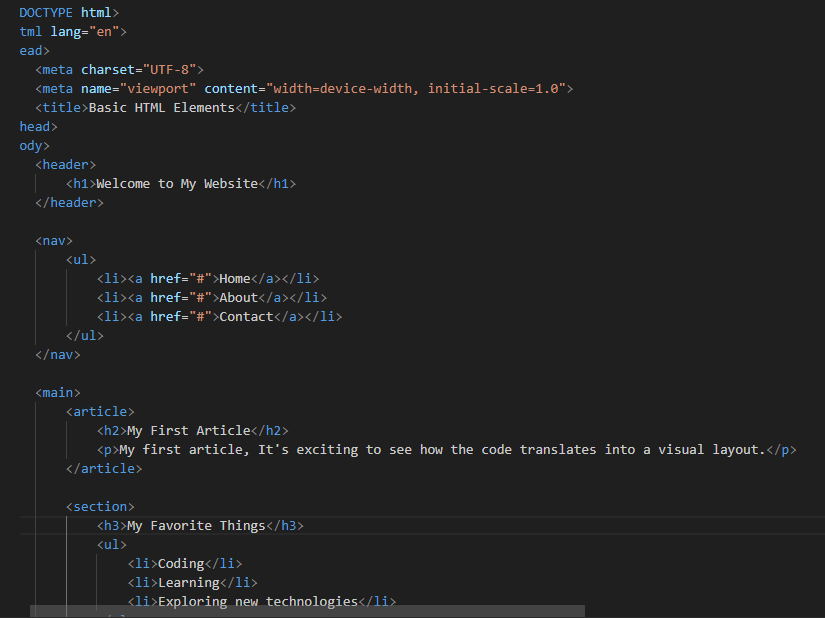
<!DOCTYPE html>: This line declares the document type as HTML5, the latest version of HTML. It tells the browser how to interpret the code.<html lang="en">: This tag marks the beginning of the HTML document. Thelangattribute is set to "en" for English, indicating the language of the content.<head>: This section houses metadata about the HTML document, such as the character set, viewport settings, and title.<meta charset="UTF-8">: Specifies the character encoding for the document, ensuring correct display of characters.<meta name="viewport" content="width=device-width, initial-scale=1.0">: Configures the viewport for responsive design, making the website look good on different devices.<title>Basic HTML Elements</title>: Sets the title of the HTML document, which appears in the browser tab.
<body>: This section contains the visible content of the webpage, everything the user sees.
2. Header:
<header>: This semantic tag represents the introductory part of the page, often containing the website's logo, navigation, or a heading.<h1>Welcome to My Website</h1>: This is the main heading of the page, using the<h1>tag for the most important heading level.
3. Navigation:
<nav>: This semantic tag defines the navigation section of the page, typically containing links to other pages or sections.<ul>: This tag represents an unordered list, displayed as bullet points.<li>: Eachlitag represents a list item.<a href="#">Home</a>: This is a hyperlink, linking to the "#" (current page) for now. You'd replace "#" with the actual URL of the "Home" page.
4. Main Content:
<main>: This semantic tag represents the main content of the webpage, excluding header and footer.<article>: This semantic tag represents a self-contained piece of content, like a blog post or news article.<h2>My First Article</h2>: A secondary heading for the article.<p>: This tag represents a paragraph of text.
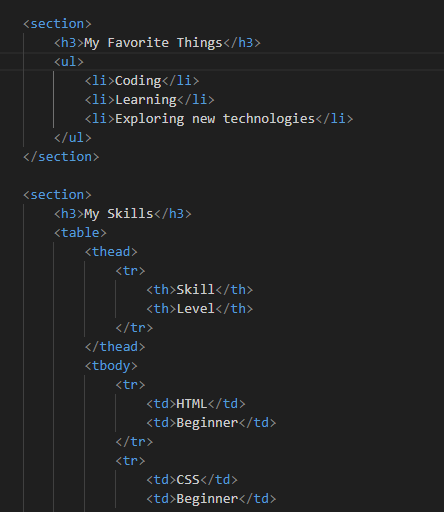
<section>: This semantic tag represents a thematic section of the page, grouping related content together.<h3>My Favorite Things</h3>: A tertiary heading for the section.<ul>: Another unordered list.
<section>: Another section.<h3>My Skills</h3>: A tertiary heading.<table>: This tag represents a table.<thead>: This tag represents the table header, containing the column names.<tr>: A table row.<th>: A table header cell.
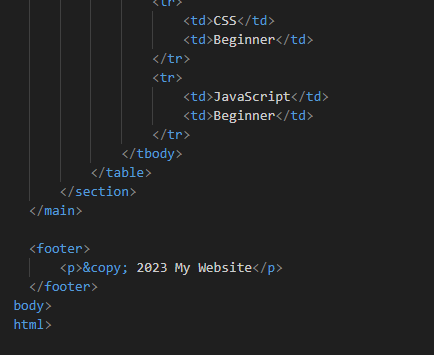
<tbody>: This tag represents the table body, containing the data rows.<tr>: A table row.<td>: A table data cell
5. Footer:
<footer>: This semantic tag represents the footer of the page, typically containing copyright information, contact details, or navigation links.<p>: A paragraph containing copyright information.
This HTML code provides a basic structure for a webpage, demonstrating the use of headings, paragraphs, lists, tables, and semantic HTML elements. Remember to replace the "#" placeholders with actual URLs for your links.
